How to Take Cake Orders on WhatsApp Without the Endless Back-and-Forth
Indian bakers lose hours every week chasing order details on WhatsApp. Here's how to set up WhatsApp Business, use one message template, and stop missing orders.

"Hi, cake chahiye for Saturday."
That's the whole message. No size, no flavour, no time, no address. Over the next hour you'll ask six questions, get four answers, receive two reference photos from Pinterest, and still find out on Saturday morning that they wanted it eggless.
If you run a home bakery or a small cake shop in India, WhatsApp is probably where most of your orders start. It's also where most of your time goes. One WhatsApp automation company that works with custom cake makers puts it at 30 to 45 minutes per enquiry just to collect the details. (CodeWords) And plenty of those enquiries never turn into orders at all.
Here's how to cut that down.
Switch to WhatsApp Business if you haven't
The free WhatsApp Business app does a few things your personal WhatsApp can't:
- A business profile with your hours, address or service area, and a link
- A catalogue where you can list cakes with photos and prices
- Quick replies: saved messages you send with a shortcut
- Labels, so you can tag chats as "New order", "Paid", "Ready", "Delivered"
- Greeting and away messages for when you're busy or asleep
You can move your existing number to WhatsApp Business without losing chats. Back up first.
Use one order message for everyone
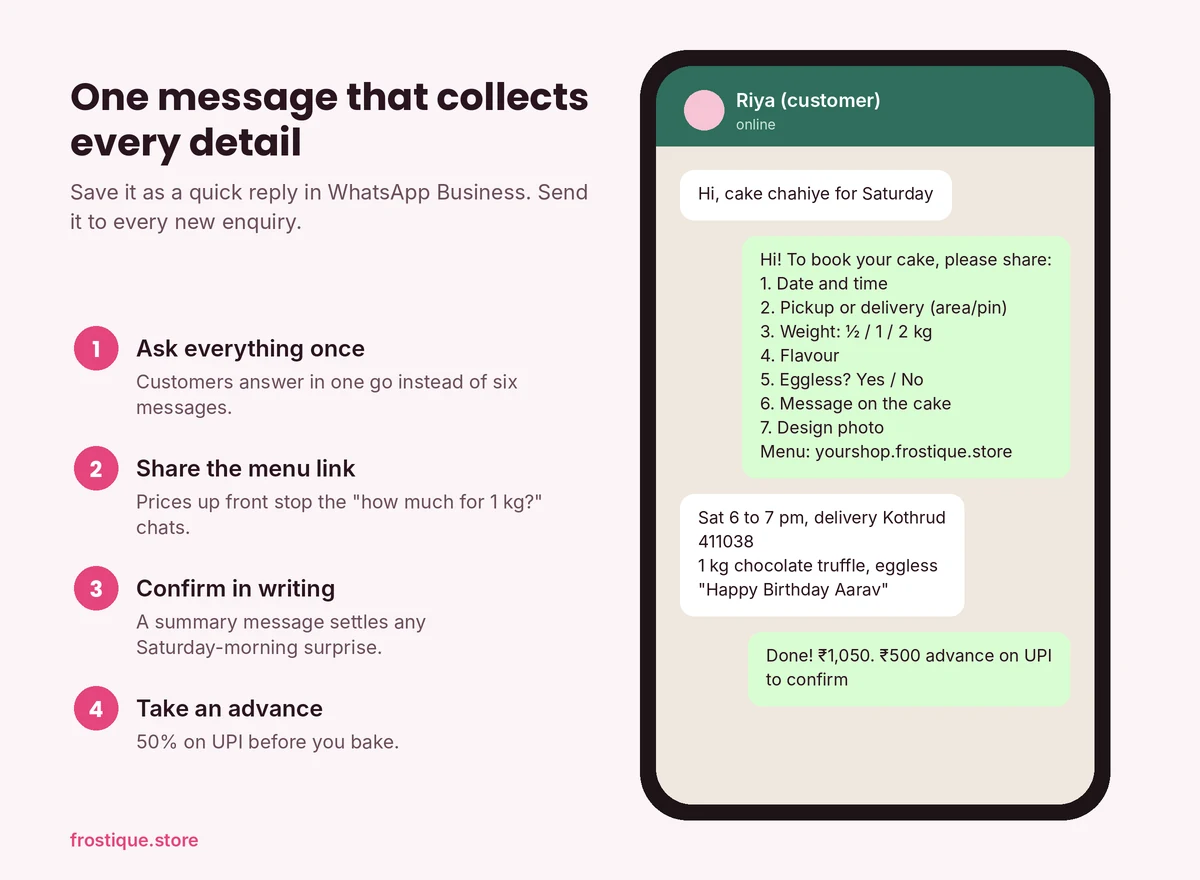
This is the single biggest fix. Save one quick reply that asks for everything at once. Something like:
Hi! Thanks for reaching out 😊 To book your cake, please share:
1. Date and time you need it
2. Pickup or delivery (with area/pin code)
3. Weight: ½ kg / 1 kg / 2 kg
4. Flavour
5. Eggless? Yes / No
6. Message on the cake
7. Any design reference (photo)

Our menu and prices: yourshop.frostique.store
Now every new chat gets the same message, and the customer answers in one go. Most will. The ones who don't are telling you something about how serious they are.
Send the menu before they ask for prices
Half the back-and-forth is "how much for 1 kg?" Put your prices in the catalogue or on an online menu and send the link in your first reply. People who can see prices upfront either order or leave. Both are better than a 40-minute chat that ends in "ok will let you know".
Confirm everything in one message
Once you have the details, send a summary and ask for a confirmation:
Confirming your order:
• Chocolate truffle, 1 kg, eggless
• Message: Happy Birthday Aarav
• Delivery: Sat 14 Nov, 6 to 7 p.m., Kothrud
• Total: ₹1,050 (₹500 advance to confirm)
This protects you when someone says on Saturday that they wanted vanilla. You have it in writing.
Take an advance before you bake
Ask for 50% through UPI to confirm the order. It filters out time-wasters and covers your ingredients if they cancel. For custom fondant cakes, many bakers take the full amount.
Keep one list outside WhatsApp
WhatsApp is a chat app, not an order book. Chats get buried. Pin all you want; by Friday you have 30 pinned chats.
At minimum, keep a simple sheet with: date, customer name, phone, cake, weight, eggless, message, pickup or delivery, total, advance paid, balance. Update it the moment an order is confirmed. Look at it every morning.
The problem is that it's double work. You type everything in WhatsApp, then type it again in the sheet. At 5 orders a week that's fine. At 25, something will slip.
When WhatsApp stops being enough
You'll know you've outgrown it when:
- You've missed or mixed up an order in the last month
- You spend more time replying than baking on weekends
- Customers ask "do you have a website?"
- You can't answer "how many cakes did I sell last month?"
At that point, the fix isn't working harder on WhatsApp. It's letting customers place the order themselves, with all the details filled in, and keeping WhatsApp for the conversation.
Frequently asked questions
Can I take cake orders on WhatsApp legally?
Yes, as long as your food business has FSSAI registration. How you take orders doesn't change that.
Is WhatsApp Business free?
The WhatsApp Business app is free to download and use. The paid WhatsApp Business API is a separate product, mostly used by larger businesses for automation.
How do I stop customers messaging at midnight?
Set business hours and an away message in WhatsApp Business. Most people respect it once they see it.
Frostique turns WhatsApp chaos into one order board. Customers pick the weight, flavour and add-ons on your online menu and book a pre-order slot, and the order lands on your dashboard with its date. For photo cakes and custom messages, the order hands off to your WhatsApp with the product already filled in, so you skip the first ten questions. Start free with up to eight products.